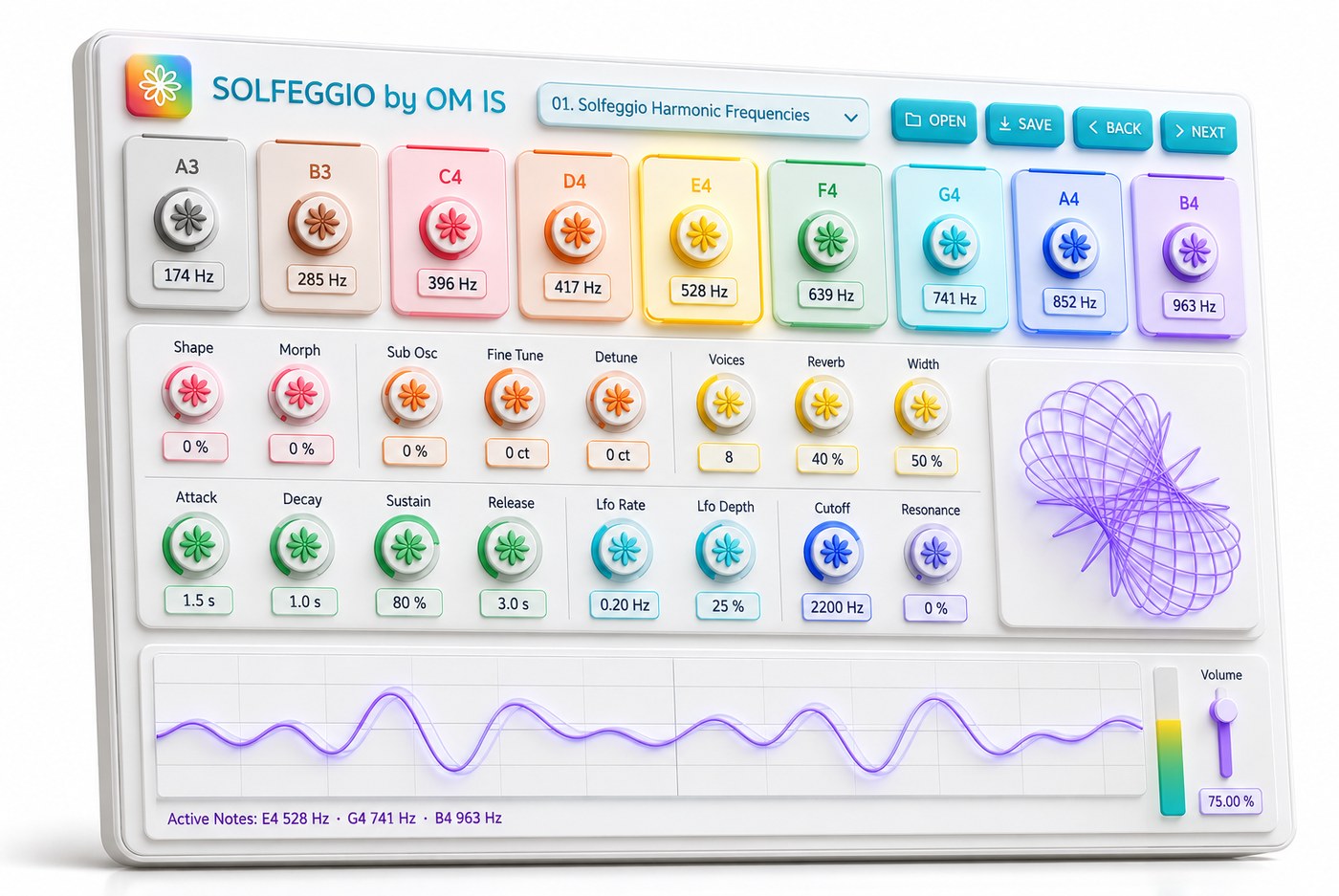
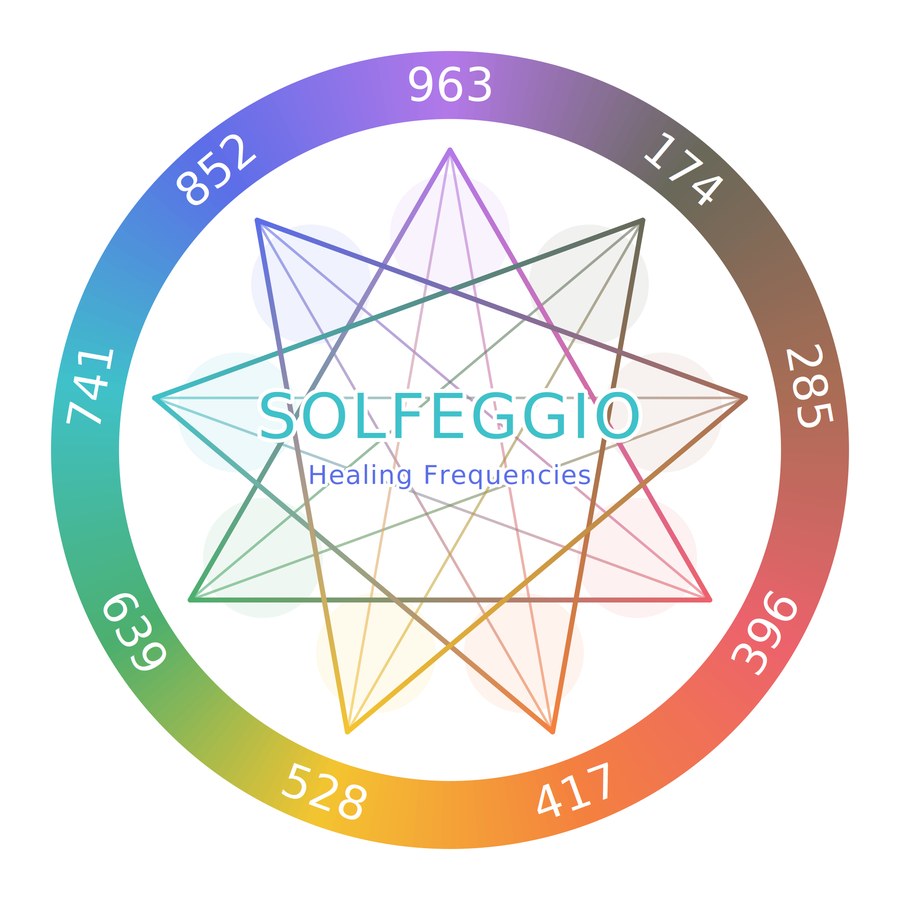
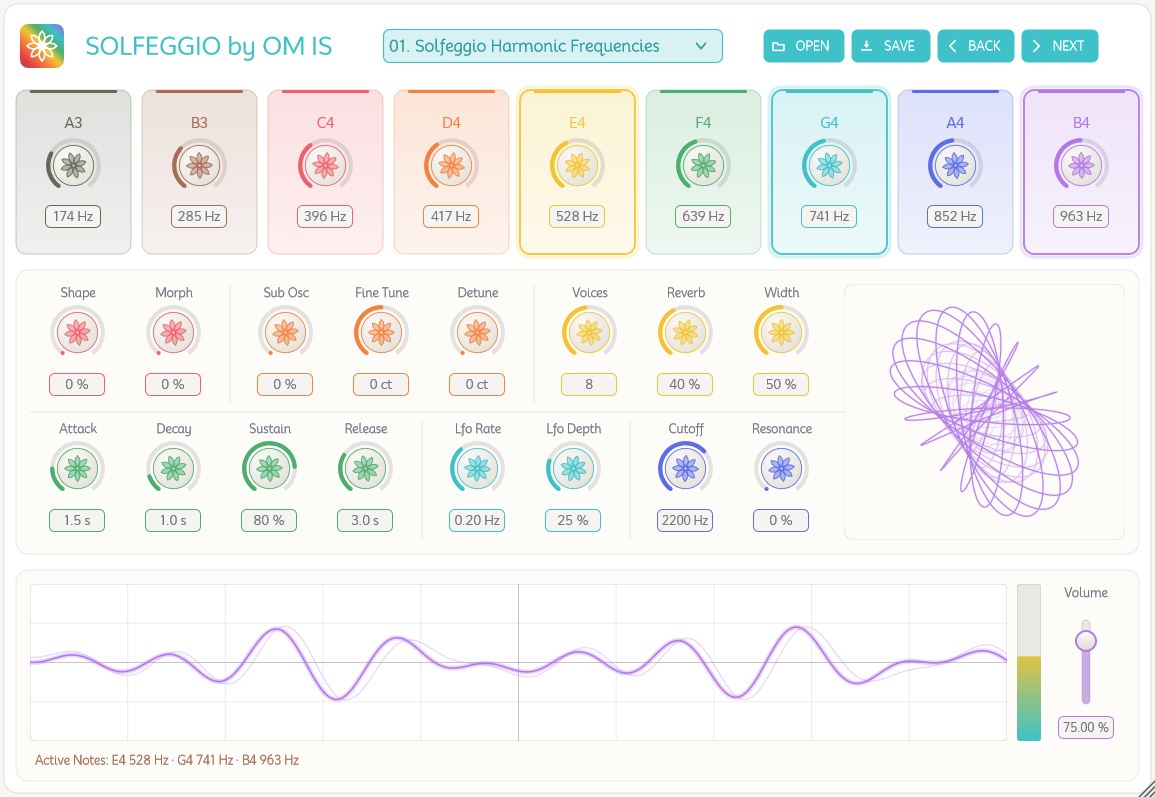
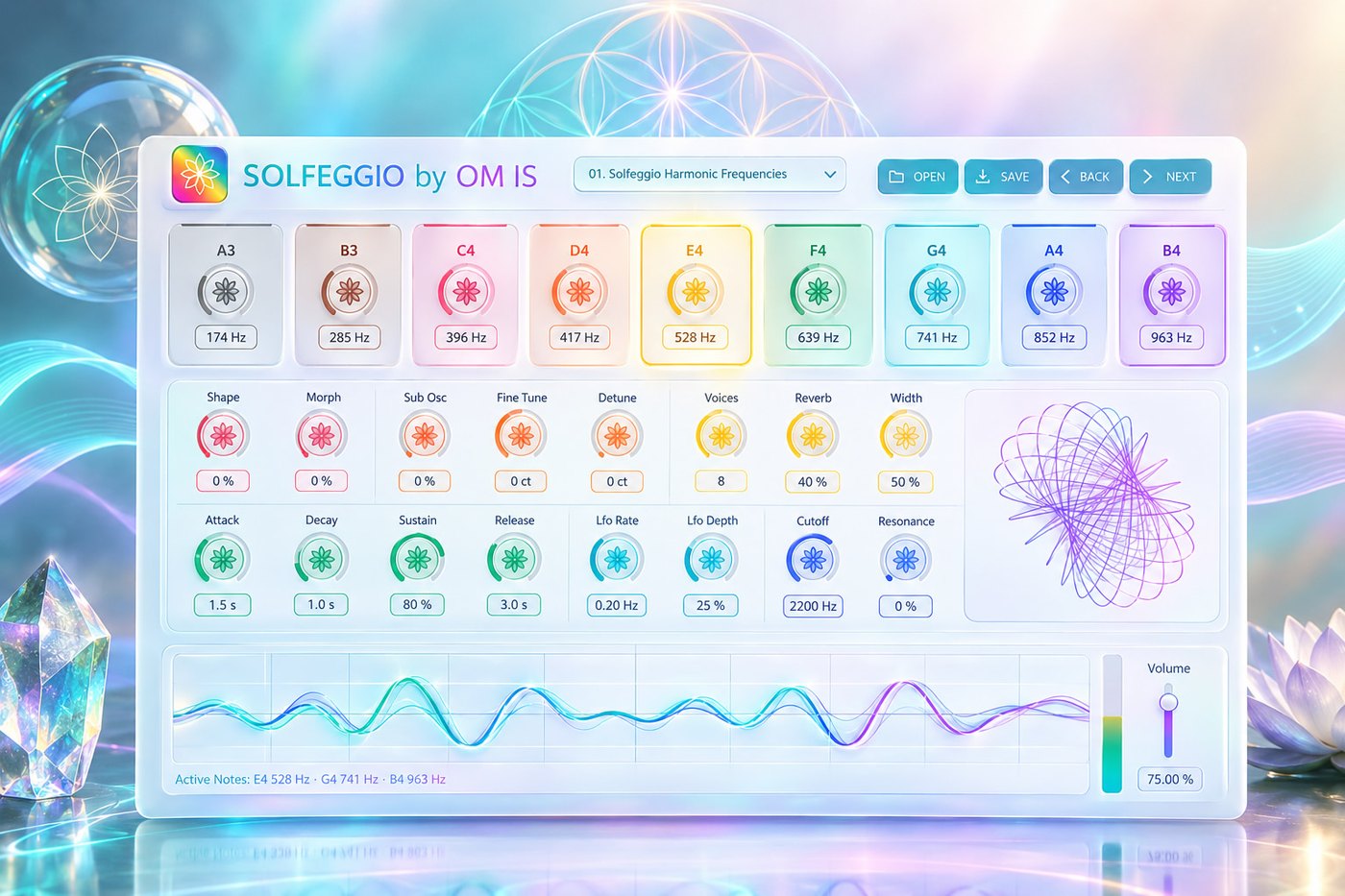
A nine-voice pad synthesizer built around the Solfeggio frequencies.
Each of the nine note cards is a fixed voice tuned to one special frequency,
playable from a MIDI keyboard, from the computer keyboard, or by clicking the
card directly.
Every control explains itself. Hover over anything in the interface and a
one-line description appears in the caption below the oscilloscope. Below you
will find more information about this VSTi, but you will rarely need to
consult it while you are working.
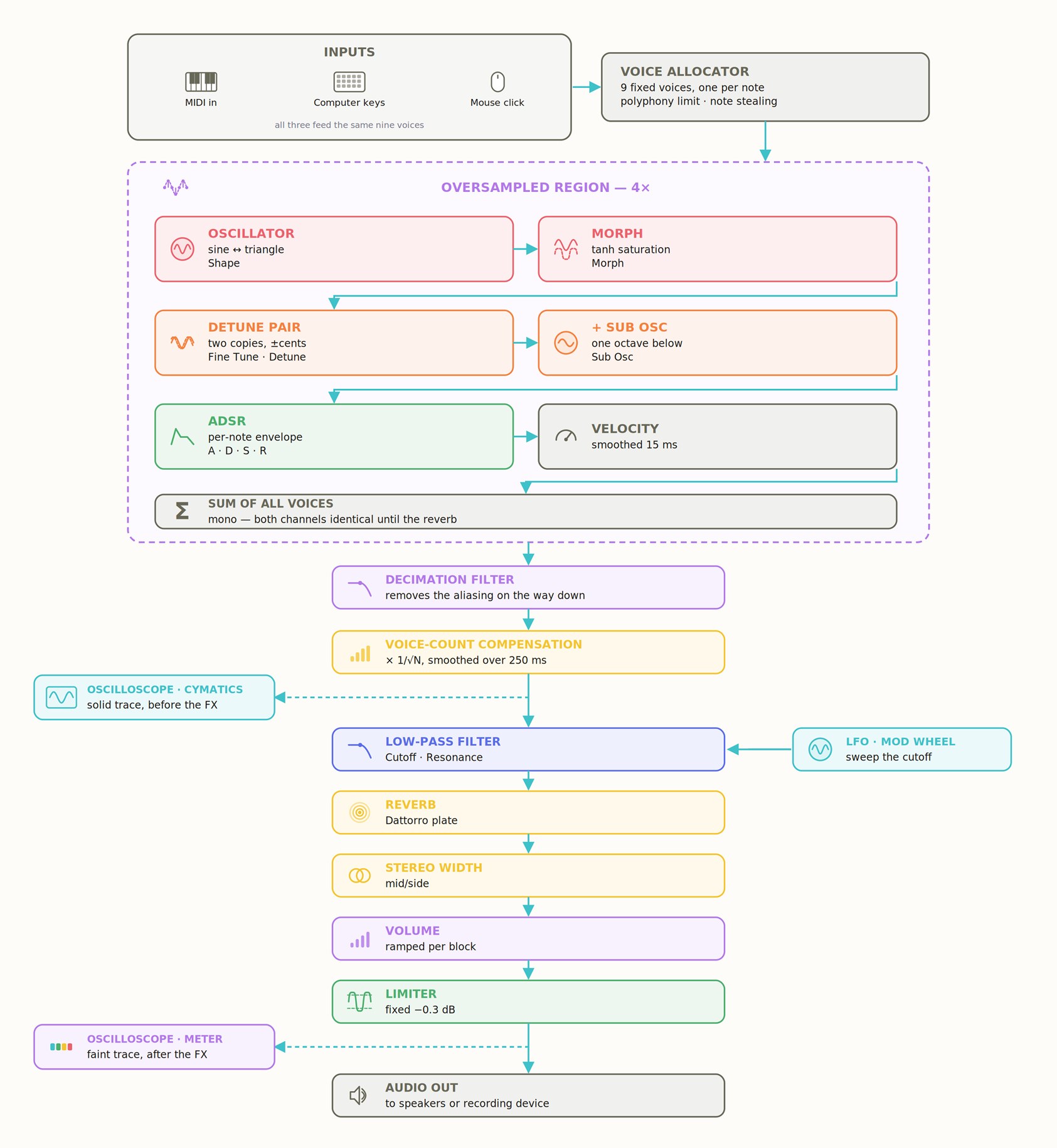
01. Signal flow
Everything below happens for every block of audio, in this order.
02. The nine notes
Each card is one voice, permanently assigned to one MIDI note. The frequency
knob sets what that voice actually plays — it is not tied to standard
equal temperament, which is the point: the note name tells you which key
triggers it, the frequency knob tells you what you hear.
Key
MIDI note
Default frequency
Traditional name
A3
57
174 Hz
Foundation
B3
59
285 Hz
Recognition
C4
60
396 Hz
UT — Liberation
D4
62
417 Hz
RE — Change
E4
64
528 Hz
MI — Transformation
F4
65
639 Hz
FA — Connection
G4
67
741 Hz
SOL — Expression
A4
69
852 Hz
LA — Intuition
B4
71
963 Hz
SI — Awakening
Each frequency knob ranges from 20 Hz to 10,000 Hz, with a skewed
response so the low end — where the Solfeggio values sit — gets most of the
knob's travel.
Three ways to play
The frequencies can be triggered from a MIDI keyboard, from the computer
keyboard, or directly with the mouse. All three feed the same voices, so they
behave identically and can be mixed freely.
With MIDI keys. Play the note listed in the table above and its card
sounds — A3 through B4, using the convention where middle C (C4) is note 60.
Keys outside that range are ignored, since only these nine notes exist. MIDI
velocity is respected: how hard you play sets the level of the note.
With the mouse on the note card. Click and hold anywhere on a card to
sound that note; release to let it go. The pointer turns into a hand over the
area that responds, so you can see what is clickable. The knob and its value
box are excluded — clicking those adjusts the frequency instead of playing,
which is what lets you tune a note without triggering it. Clicking the note
name plays the note.
With the computer keyboard. Two rows are mapped to the same nine notes,
so whichever hand position suits you works:
A3
B3
C4
D4
E4
F4
G4
A4
B4
Number row
1
2
3
4
5
6
7
8
9
Home row
A
S
D
F
G
H
J
K
L
Swipe to see all nine notes →
Unlike the mouse this is polyphonic — hold several keys and you get a
chord, subject to the Voices limit.
The plugin window has to have focus for its keys to reach it. Two
consequences: notes never trigger while you are working in another window, and
typing a frequency into a value box types normally instead of playing.
While the plugin window holds focus it also takes key presses
the host would otherwise use — spacebar for transport, for instance. Click
elsewhere in the host to give those back.
Every held note lights up. Play a chord and all of its cards are
highlighted at once, whichever way you played them. The highlight follows the
keys, not the sound: it clears the moment you let go, even though a long
release keeps the note ringing for seconds afterwards.
Two differences worth knowing:
The mouse plays one note at a time, since there is only one pointer.
For chords use MIDI or the computer keyboard.
Mouse and computer-keyboard notes use a fixed medium velocity, so they
always sound at the same level. Only MIDI carries real velocity.
Pitch and modulation wheels
Both wheels on a MIDI keyboard are live, and neither has any effect at its
resting position — a centred pitch wheel and a mod wheel rolled down leave the
sound exactly as the knobs set it.
Pitch wheel — ±2 semitones. Bends every sounding note, including the
sub-oscillator and the detuned pair, so the whole voice moves as one. Two
semitones is the near-universal default that hosts assume.
Bending takes the notes away from their exact Solfeggio values,
which may or may not be what you want. Leave the wheel centred whenever the
precise frequencies matter.
Mod wheel (CC 1) — opens the filter. Multiplies the Cutoff setting by up
to 4× as you push it up, on top of whatever the LFO is doing. With the Cutoff
knob at its default 2200 Hz the wheel sweeps up to 8800 Hz. The curve is
exponential rather than linear, because brightness is perceived
logarithmically — a linear sweep would seem to do nothing across the first half
of the wheel and everything across the last.
This is the quickest way to make a pad breathe without touching the interface:
hold a chord and ride the wheel.
Both wheels are smoothed over about 20 ms, so the discrete steps a wheel
actually sends never come through as stair-stepping or crackle. A host's
reset all controllers message returns both to their resting positions.
03. Oscillator section
Osc group
Shape 0–100 %
Blends the waveform continuously from a pure sine at 0 % to a triangle at
100 %. A sine has only the fundamental; a triangle adds odd harmonics that fall
away quickly, so the sound gains a little edge without becoming harsh.
Morph 0–100 %
Soft saturation. The waveform is pushed through a tanh curve, which
progressively flattens the peaks toward a square-ish shape. At 0 % the signal
passes untouched. Turning it up adds harmonics and loudness density rather than
raw level.
Why the oscillators run oversampled: triangle and
saturation both create harmonics above the audible range. At the normal sample
rate those fold back down as inharmonic tones — audible as a metallic ring on
high notes. The oscillator section therefore runs at 4× the sample rate, and the
filter applied on the way back down removes them.
Pitch group
Sub Osc 0–100 %, default 20 %
Adds a sine one octave below the note. Gives weight and grounding. Its phase is
reset together with the main oscillator on each fresh note so it can never
partially cancel the fundamental.
Fine Tune −50 to +50 cents
Shifts every voice by the same amount. 100 cents is one semitone. Use it to
match another instrument or a reference pitch. Set it to 0 if you want the exact
Solfeggio values.
Detune 0–50 cents, default 8
Each voice plays two copies, one tuned down and one up by this amount. Their
slow beating produces the chorus-like movement typical of pads. At 0 the two
copies coincide and the tone is perfectly clean.
Voice group
Voices 1, 2, 4, 8, 16 — default 4
How many notes may sound at once. Only held notes count toward the limit;
release tails do not, so long releases never cause the note you are still
holding to be cut off. When the limit is reached the oldest held note is faded
out over 8 ms.
Reverb 0–100 %, default 40 %
A single control driving decay, damping and the wet/dry balance together. Decay
and wet level rise with the knob while the dry level eases back, so the sound
moves into the space rather than just having reverb piled on top.
The reverb is a Dattorro plate: its tail is built from
all-pass filters, two of them slowly modulated, rather than from a bank of comb
filters. That matters here because this synth holds long, nearly pure tones.
Width 0–100 %, default 50 %
Mid/side stereo width. 50 % is unity — the untouched signal. Below 50 % the
sides are reduced toward mono; above 50 % they are amplified for a wider image.
Since the voices are generated in mono, width mainly acts on the stereo content
the reverb creates.
Envelope group (ADSR)
Shapes the level of each note over time.
Attack 0–8 s, default 1.5 s
Time to rise from silence to full level. Long values are what make this a pad
rather than a struck instrument.
Decay 0–8 s, default 1.0 s
Time to fall from full level down to the sustain level, after the attack
completes.
Sustain 0–100 %, default 80 %
The level held for as long as the note is held down.
Release 0–10 s, default 3.0 s
Time to fade to silence after the note is let go.
Envelope changes apply to notes that are already held, so you can shape a
chord while it is sounding. Notes already in their release tail keep the setting
they were released with.
LFO group
A slow sine that modulates the filter cutoff — it does not affect pitch.
Lfo Rate 0.05–2 Hz, default 0.20 Hz
Speed of the sweep. At 0.20 Hz one full cycle takes five seconds.
Lfo Depth 0–100 %, default 25 %
How far the cutoff is swept. At 0 % the filter stays fixed.
Tone group
Cutoff 200–8000 Hz, default 2200 Hz
Low-pass filter. Frequencies above the cutoff are attenuated, so lowering it
darkens the tone. Note that this is also what makes Shape and Morph harder to
hear: both work by adding upper harmonics, and a low cutoff removes exactly
those.
Resonance 0–100 %, default 0 %
Emphasises frequencies right at the cutoff. At 0 % the response is flat. Raising
it makes the LFO sweep far more audible, since there is now a peak travelling
through the sound.
04. Output section
Volume 0–100 %, default 80 %
Output level, ramped smoothly within each block so moving or automating it
produces no stepping or zipper noise.
Level meter
Post-limiter output level. The gradient runs from G4's blue at the bottom,
through E4's yellow, to C4's red at the crest.
Limiter
Always active, fixed at a −0.3 dB ceiling. It is a safety net against clipping,
not a sound-design tool, which is why it has no controls.
Voice-count compensation
Voices add together, so two notes in phase are genuinely 6 dB louder than one.
To keep chords from jumping in level, the summed output is scaled by
1/√N, where N is the number of sounding voices:
Voices
Adjustment
1
0 dB
2
−3 dB
4
−6 dB
9
−9.5 dB
1/√N rather than a full 1/N is deliberate: full normalisation would make a
chord quieter per note than a single note, which sounds unnatural. The change
is ramped over 250 ms so fast playing produces a gentle swell rather than
pumping.
05. Displays
Oscilloscope — two traces on the same axes:
Solid, glowing trace — the oscillators, before the filter and reverb.
This is where Shape and Morph are clearly visible.
Faint trace behind — the final output, after filter, reverb and
limiter. The difference between the two is the effect of the FX chain.
Both are drawn only while a note is sounding.
The information line
The line below the oscilloscope doubles as a help bar. It shows whichever of
the following applies, in this order.
Hovering a control describes it. Point at anything — a knob, a note card,
a button, the preset list, the meter, either display — and its description
appears:
Detune — each voice plays two copies this far apart. Their beating is the chorus movement.
All 34 controls are covered, the nine note cards included. Pointing at something
is a deliberate question, so this takes priority over everything else on the
line.
While notes are playing it lists every active note with its current
frequency:
Active Notes: C4 396 Hz · E4 528 Hz · G4 741 Hz
Otherwise it shows the full path of the preset currently loaded:
Loaded Preset: C:\Users\you\Documents\Solfeggio by OM IS\Presets\01. Solfeggio Harmonic Frequencies.xml
This is the resting state of the line, so it is always there to answer which
file you are actually hearing — and where your presets folder is. Pressing Back
or Next also brings it up for a few seconds, over the button's own description:
the press was a request to see which preset is now loaded.
06. In action
Six presets ship with the plugin. They are written into the Presets folder the
first time it loads, and an existing file is never overwritten — if you
edit one and save over it, your version is kept.
The plugin opens on 01. Solfeggio Harmonic Frequencies. When a host
restores a saved session, that session's own settings take over instead, which
is what you want: a saved project must sound the way you left it.
Just-intonation ratios on 396, closing on its octave at 792.
Because the frequency knobs are free, these are starting points rather than
fixed tunings — move any note and the preset becomes yours.
Presets are XML files stored in:
Documents / Solfeggio by OM IS / Presets /
The folder is created automatically the first time the plugin loads.
PRESET LIST — click to open; the folder is rescanned every time, so
presets renamed, added or deleted in your file explorer appear immediately.
OPEN — load a preset from anywhere on disk.
SAVE — opens a save dialog. If a preset is selected, it offers that
exact file so saving overwrites it; otherwise it suggests a name based on the
current one.
BACK / NEXT — step through the list, wrapping around at either end.
A preset stores every parameter, including all nine note frequencies.
From the host's preset browser
The presets are also exposed to the DAW as programs, so they appear in
the host's own preset selector — the strip the DAW draws around the plugin
window — not only in the plugin's list.
That means you can switch preset without opening the plugin, automate preset
changes on the timeline, and drive them from a controller that sends MIDI
Program Change.
Both lists are the same data in the same order, and they stay in step: pick a
preset in the host and the plugin's list follows, and vice versa. Saving a new
preset makes it appear in both.
BONUS PRESET: Folder with (16) selected presets
.xml files to load into Solfeggio by OM IS.